Azure DevOps MCP in Foundry: My First Real Test
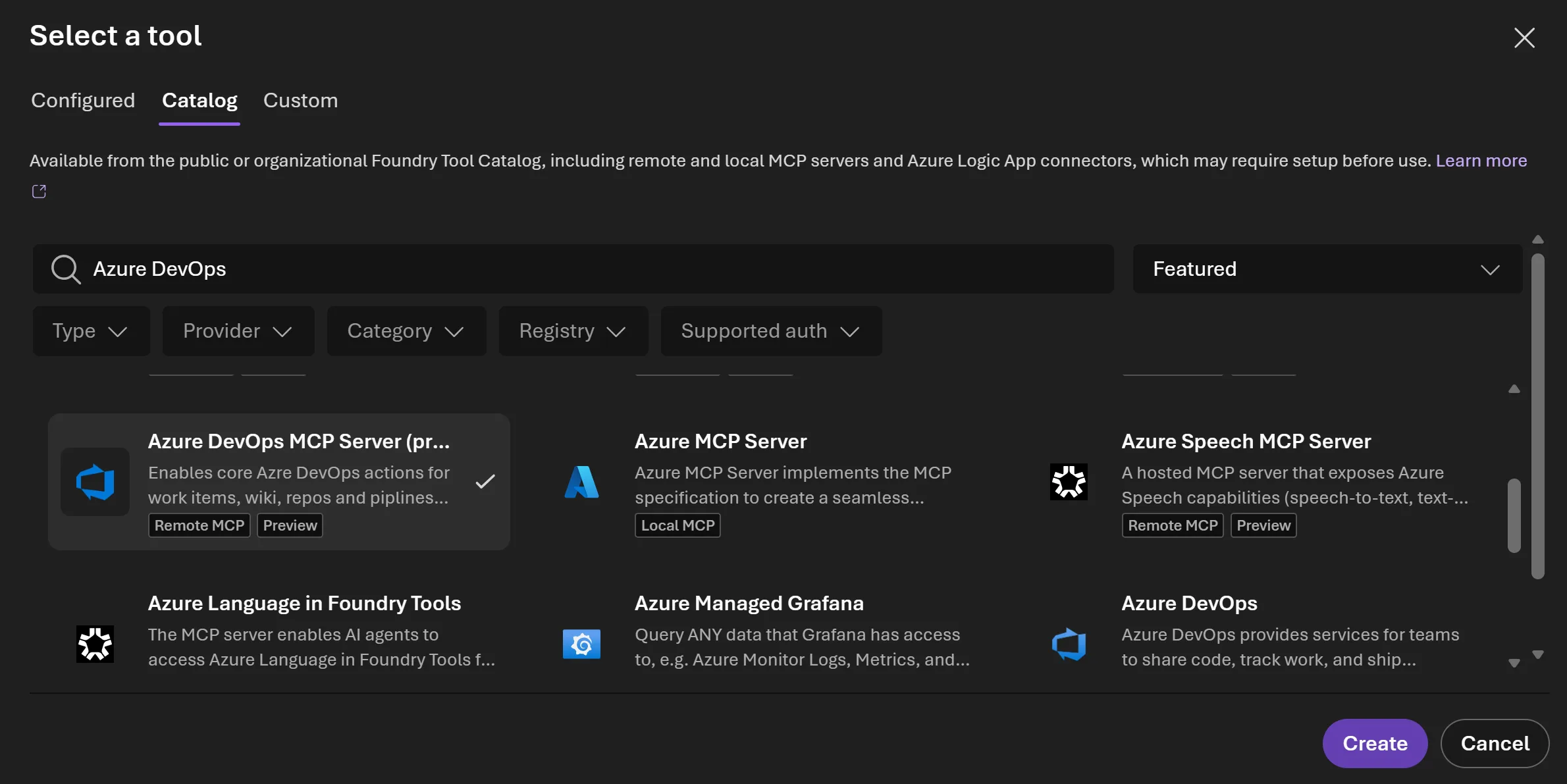
When Microsoft put the Azure DevOps MCP Server into preview inside Microsoft Foundry, my first reaction was simple: okay, this is actually useful. Not flashy. Not hype-for-hype’s-sake. Just one of those integrations that quietly removes a few annoying steps between “I have an idea” (at least that’s been my experience). “the agent can do something with it.” And honestly, that’s where a lot of good platform work lives.
I’ve spent enough years around Azure, DevOps,. Cloud automation to be suspicious of anything that sounds too smooth on paper. Usually there’s a catch somewhere. A permissions wrinkle. A half-baked connector. Or the classic “it works in demo, then falls apart in real life.” But this one? It feels like Microsoft is moving toward something practical: letting agents reach into Azure DevOps in a controlled way without making every team build custom glue code from scratch.
Enough talk, let me show you.
The interesting part isn’t just that the Azure DevOps MCP Server exists — it’s that Foundry gives you a place to wire it into an agent workflow without turning the whole thing into a science project.
Why this matters more than it looks
Let me back up for a second. If you haven’t been living in the AI-agent world for the last year or so, here’s the short version: agents are only useful when they can actually do things. Reading documents is nice. Summarizing tickets is fine. But once an agent can query work items, inspect plans, look at repos, or help coordinate delivery tasks across teams, now we’re talking about something people might use every day instead of once during a demo and almost never again — honestly, a bit of a letdown —
Let me put it this way, Microsoft Foundry is basically trying to be the control room for that kind of work. Model access, orchestration, evaluation, deployment — all in one place. I’ve seen enough fragmented setups over the years to appreciate this direction. Back in 2023, while helping a manufacturing client in Düsseldorf design an internal assistant stack, we spent more time stitching services together than building actual business value. That project worked eventually, sure… but it was messy. This kind of integrated approach would’ve saved us weeks.
Let me tell you — The Azure DevOps MCP Server preview fits nicely into that picture. It gives agents access to DevOps capabilities through a standardized tool layer instead of hardcoding one-off API calls everywhere. That’s not glamorous. It is useful though — and sometimes useful beats clever by a mile.
Getting it into Foundry isn’t complicated
The setup flow is refreshingly straightforward. Actually — hold on, let me say that carefully — it’s straightforward if your tenant governance isn’t already a knot of conditional access policies and permission exceptions from three different security reviews. In a clean environment, you go into Foundry, open Add Tools, head to Catalog, search for Azure DevOps, and pick Azure DevOps MCP Server (preview). Then you create the connection by entering your organization name and authenticating.
Let me break this down.
You can attach the tool before creating the agent or add it later after the fact. That flexibility matters more than people think. In one customer workshop I ran in Istanbul last November — with two product owners who were both convinced their workflows were “special” — we ended up changing our agent design three times before settling on what should actually be exposed as tools versus what should stay read-only context. If setup had been rigid from day one, we’d have wasted half the session arguing with the platform instead of designing something sensible.
A rough mental model for how I’d approach it
Create agent
└── Add Azure DevOps MCP Server tool
└── Connect organization
└── Restrict available actions
└── Test with chat prompt
└── Review output + permissions
Now look, That sequence looks boring on paper, which is exactly why I like it. Boring infrastructure tends to survive contact with reality better than clever infrastructure.
And things get interesting here.
The part people will get wrong first
Here’s what I noticed: The elephant in the room is tool scope. You can expose multiple capabilities to your agent once connected… but should you? Probably not all at once.
I’ve seen teams make this mistake repeatedly: they connect everything because it feels productive during week one, then spend week two figuring out why their assistant keeps suggesting actions nobody intended to automate yet. You’re probably thinking “what’s the big deal,” right? The smarter move is to limit which tools are available at first and expand slowly based on actual usage patterns.
| Approach | What happens | My take |
|---|---|---|
| Expose everything immediately | Fast start, messy governance later | Tempting… and usually regretted by Friday afternoon |
| Select only needed tools | Tighter control and cleaner behavior | The boring option; also the better one most of the time |
| Pilot with one team first | Easier feedback loop and fewer surprises | This is what I’d recommend for almost every enterprise rollout |
Now look, A colleague of mine in Amsterdam tried an overly broad setup earlier this year for an internal engineering assistant prototype. It looked impressive during testing until users started asking for things outside policy boundaries and half the conversations became “sorry, I can’t do that.” We narrowed tool access afterward and adoption improved almost immediately because expectations matched reality better (I’m serious)
A practical test beats theory every time
The best way to judge this preview is not by reading marketing language or staring at architecture diagrams until your eyes hurt (been there). It’s by creating an actual chat experience inside Foundry. Seeing whether the agent can complete something meaningful without wandering off into nonsense.
A simple test prompt might look like this:
"Show me recent work items assigned to my team related to release blockers,
then summarize any high-risk items for today’s standup."
If that works cleanly enough for your environment, great — now you’ve got something real. If not… well, then you know exactly where the friction lives instead of guessing for three weeks while everyone nods politely in meetings.
Believe it or not, I tried something similar back in early March 2024 on my own lab tenant using a small internal demo workspace here near Ankara Airport while waiting between meetings (yes, really). The result wasn’t perfect at first; authentication — which is debatable — took longer than expected because I had layered permissions from previous experiments onto my account like digital luggage nobody asked for. Still, once cleaned up, the integration behaved predictably enough to make me optimistic.
What I liked — and what still needs work
- Simplicity: The connection flow doesn’t feel overengineered.
- Enterprise direction: It fits naturally into controlled AI app development rather than shadow-IT experimentation.
- Flexibility: Adding tools before or after agent creation makes life easier during prototyping.
- Caution required: Preview status means behavior may change; don’t build mission-critical processes around assumptions yet.
- User discipline: If governance isn’t tight enough, agents will become noisy very quickly.
I’ll be blunt: previews are previews (I was shocked when I first found out). Sometimes they’re surprisingly stable; sometimes they’re just polished enough to hide edge cases until production traffic finds them like gravity finds dropped phones. So yes — promising stuff here — but don’t confuse “available” with “fully mature.” That distinction has cost teams money before.
The bigger picture for dev teams using Azure DevOps
This integration points toward something larger than just another connector list item inside Foundry catalog pages nobody remembers after launch day. It’s part of a shift where developer platforms stop being isolated systems. Start becoming conversational surfaces that AI agents can safely interact with under policy control.
Weird as it sounds, If you manage product delivery pipelines today, imagine having an assistant that can summarize backlog health before sprint planning starts on Monday morning at nine sharp; or help product managers surface stalled items without manually digging through boards; or guide support engineers toward active incidents linked to recent changes without asking three different teams for screenshots first (I’m serious). That’s where value shows up fast… not in some abstract future state.
If you want related context from our side of things, I’d also recommend reading my thoughts onAzure Boards Markdown Editing: A Small UX Fix That Matters. Different topic obviously,. Same underlying lesson: small usability improvements inside dev tooling often matter far more than grand speeches about transformation ever will.
The bottom line? Azure DevOps MCP Server in Microsoft Foundry looks pretty solid as a preview feature if you approach it like an architect rather than like someone chasing shiny objects on launch day . Keep scope tight . Test realistically . And don’t forget that AI agents are still only as good as the guardrails around them!
My advice after years of cloud projects is simple: start narrow, validate hard facts first , then widen access only when people trust what the agent does.
A final thought from field experience
I’m cautiously optimistic about this one… which may sound lukewarm if you’re used to loud product takes online , but cautious optimism is usually where durable architecture begins (I was shocked when I first found out). When Microsoft connects core engineering systems like Azure DevOps into Foundry through remote MCP tooling , they’re giving teams another path toward useful automation without forcing everyone down custom integration rabbit holes . That alone makes it worth paying attention to (yes, you read that right).
No magic here . Just decent engineering choices , sensible controls , and a preview worth testing if your organization is already investing in AI-powered workflows . Let’s see how fast it matures from here…
Source: [Remote MCP Server preview in Microsoft Foundry](https://devblogs.microsoft.com/devops/remote-mcp-server-preview-in-microsoft-foundry/)
Share this:
📬 Bu yazıyı faydalı buldunuz mu?
Azure, DevOps ve bulut teknolojileri hakkında güncel içerikler için beni takip edin!
📚 Benzer Yazılar


Post Comment